Digital product passport resources
Digital Product Passport Implementation Checklist for Small Manufacturers (Step-by-Step)
Digital Product Passports are becoming an important part of how products are documented, shared, and evaluated across supply chains. For small manufacturers, textile brands, EU sellers, and importers, the challenge is not only understanding the concept — it is turning it into a practical implementation plan.
This Digital Product Passport implementation checklist is designed for small teams that need a structured way to prepare product information, organize internal workflows, and start creating shareable product passports without building a technical system from scratch.
> Note: This article is for general informational purposes only. Digital Product Passport requirements may vary by product category, regulation, market, and timeline. It does not replace legal or regulatory advice.
What Is a Digital Product Passport Implementation Checklist?
A Digital Product Passport implementation checklist is a practical plan for preparing the data, processes, and tools needed to create and manage Digital Product Passports.
For small manufacturers, the checklist usually covers:
- Which products should be prioritized
- What product data needs to be collected
- Where that information currently exists
- Who is responsible for maintaining it
- How the passport will be shared with customers, partners, or supply chain actors
- How product information will be updated over time
The goal is not to make everything perfect on day one. The goal is to create a clear, repeatable process that helps your business prepare product data in a structured format.
Step 1: Identify Which Products Need a Digital Product Passport First
Start by choosing a manageable product group instead of trying to document your entire catalog at once.
A good first product group might be:
- A best-selling product
- A product sold in the EU market
- A product with sustainability, material, or repairability information already available
- A product category likely to be affected by upcoming Digital Product Passport requirements
- A product with reliable supplier documentation
For example, a small textile brand might start with one jacket, one fabric line, or one seasonal collection. A small equipment manufacturer might begin with one high-volume component or one finished product family.
Checklist
- [ ] Select one product or product family for your first passport
- [ ] Confirm the product name, SKU, and internal reference number
- [ ] Identify the target market where the product is sold
- [ ] List the departments or people involved in product documentation
- [ ] Decide whether this will be a pilot project or a full internal rollout
Step 2: Map the Product Information You Already Have
Before collecting new data, review what your company already stores. Many small manufacturers already have useful information, but it may be spread across spreadsheets, supplier emails, ERP exports, PDFs, labels, certificates, and technical files.

*Paso 2: reunir y mapear las fuentes actuales de datos (fichas, BOM, etiquetas, certificados y documentos técnicos) antes de empezar a crear el passport.*
Common sources include:
- Product specification sheets
- Bills of materials
- Supplier declarations
- Quality documentation
- Sustainability reports
- Care, use, or maintenance instructions
- Packaging files
- Product labels
- Technical drawings
- Compliance documentation
- Internal product databases
The key is to locate the data, assess its quality, and understand what is missing.
Checklist
- [ ] List all current product data sources
- [ ] Identify who owns each source internally
- [ ] Check whether data is current or outdated
- [ ] Separate verified data from uncertain data
- [ ] Note missing fields that may need supplier input
Step 3: Define Your Core Digital Product Passport Data Fields
A Digital Product Passport can include different information depending on the product category and regulatory context. For a first implementation, small manufacturers should begin with a practical set of core fields.
Possible fields include:
- Product name
- Product model or SKU
- Brand or manufacturer name
- Product category
- Country of manufacture or assembly
- Materials and components
- Supplier or production batch references
- Product dimensions or technical specifications
- Care, maintenance, or repair instructions
- Safety or usage information
- Packaging information
- Sustainability-related information, where available
- Recycling or disposal guidance
- Documentation links or references
You do not need to publish every internal detail. The purpose is to define what information is relevant, accurate, and appropriate to share.
Checklist
- [ ] Create a standard data field list for your first passport
- [ ] Mark each field as required, optional, or future improvement
- [ ] Identify which fields are public and which should remain internal
- [ ] Confirm the source of truth for each field
- [ ] Assign an owner for keeping each field updated
Step 4: Validate Supplier and Material Data
For many manufacturers, the most difficult part of Digital Product Passport implementation is supplier data. Small businesses often depend on suppliers for material composition, component origin, technical specifications, and sustainability documentation.
Create a simple supplier data request process. Avoid vague requests such as “send sustainability information.” Instead, ask for specific fields and formats.
For example:
- Material composition by percentage
- Component names and references
- Country of origin
- Recycled content, if available and documented
- Care or handling requirements
- Repair or spare part information
- Relevant declarations or technical documentation
Checklist
- [ ] Identify which suppliers are needed for the pilot product
- [ ] Create a supplier data request template
- [ ] Ask for specific fields instead of general documents
- [ ] Store supplier responses in a central location
- [ ] Mark unverified or incomplete supplier data clearly
Step 5: Choose a Simple Structure for Your Passport
Once you know what data you have, decide how your Digital Product Passport will be structured. A clear structure helps customers, partners, and internal teams understand the information quickly.
A simple structure might include:
- Product identity
- Manufacturer or brand information
- Materials and components
- Use, care, maintenance, or repair information
- Sustainability-related details, where available
- End-of-life, recycling, or disposal guidance
- Documentation or reference links
The structure should be consistent across products. This makes future passports faster to create and easier to manage.
Checklist
- [ ] Define the sections of your passport
- [ ] Decide the order in which information will appear
- [ ] Use consistent terminology across products
- [ ] Avoid adding fields that your team cannot maintain
- [ ] Create a reusable template for future passports
Step 6: Decide How the Digital Product Passport Will Be Accessed
Digital Product Passports are useful when people can access them easily. Many companies plan to connect passports to product pages, QR codes, labels, packaging, or customer support materials.
For a small manufacturer, practical access points may include:
- A QR code on the product label
- A QR code on packaging
- A link from the product page
- A link in technical documentation
- A link shared with distributors or retailers
- A link included in after-sales support materials
Your access method should match the product and the customer journey. A textile product may use a label or hangtag. A machine component may use documentation, packaging, or a product plate.
Checklist
- [ ] Choose the primary access method for the passport
- [ ] Decide whether QR codes, links, or both will be used
- [ ] Test access on mobile devices
- [ ] Confirm that the passport is easy to read
- [ ] Plan how links or QR codes will be managed if information changes
Step 7: Assign Internal Responsibilities
A Digital Product Passport is not a one-time document. Product information can change when suppliers change, materials are updated, batches are modified, or instructions are revised.
Small manufacturers should define responsibilities early to avoid confusion.
Typical roles include:
- Product manager: confirms product identity and specifications
- Operations or production lead: verifies manufacturing details
- Procurement: collects supplier information
- Quality or compliance lead: reviews technical documentation
- Marketing or ecommerce: checks customer-facing wording
- Management: approves the rollout process
In a small company, one person may cover several roles. The important point is that responsibility is explicit.
Checklist
- [ ] Assign an owner for each passport
- [ ] Assign an owner for supplier data collection
- [ ] Assign a reviewer for customer-facing content
- [ ] Define who approves passport publication
- [ ] Create a process for updates and corrections
Step 8: Create Your First Digital Product Passport
After preparing the product data, structure, and responsibilities, create your first passport. Start with one product and keep the scope controlled.
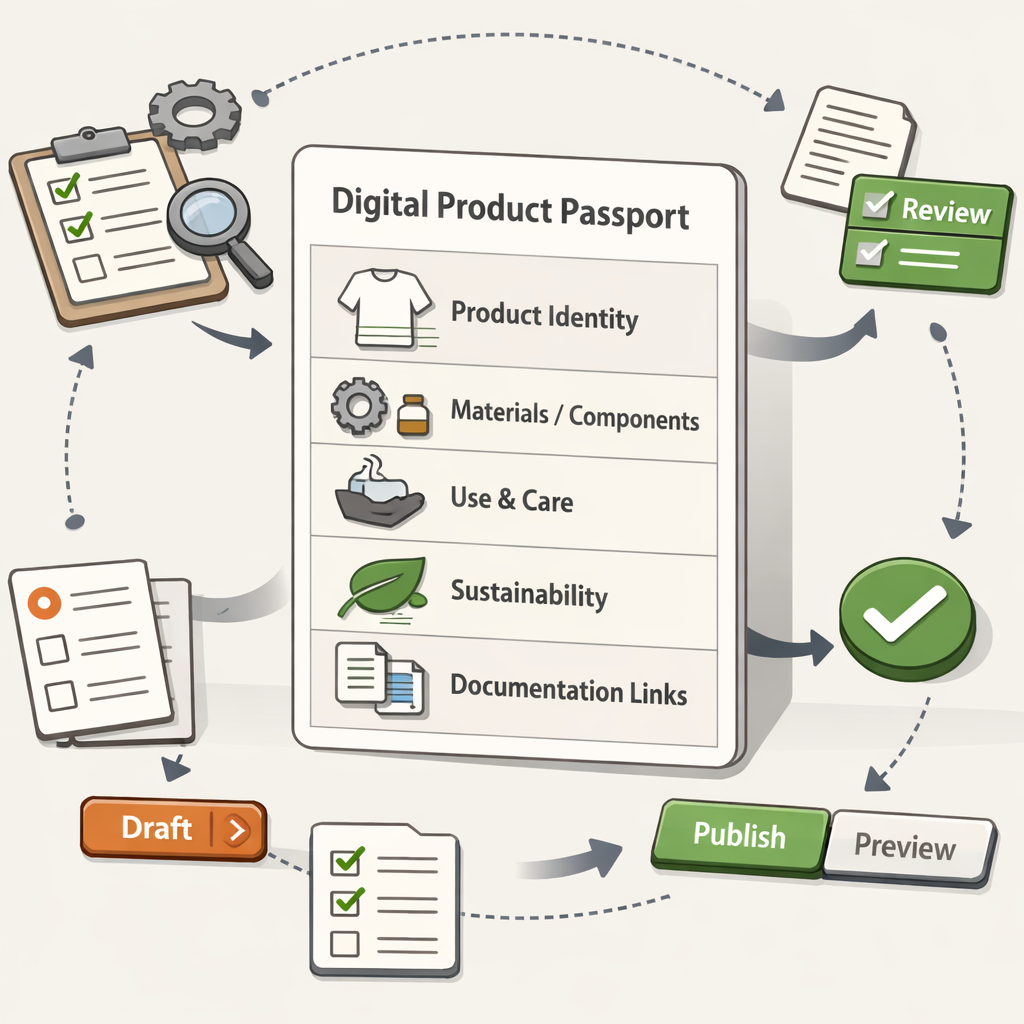
*Paso 8: crear un primer passport con una estructura consistente por secciones, listo para revisar y compartir con el equipo y socios.*
This is where a tool such as Product Passport Base can help small manufacturers create, manage, and share Digital Product Passports without developing a custom technical solution from zero.
Product Passport Base is designed to support a simple workflow for creating product passports and organizing product information in a shareable format. It can be useful for teams that want to move from scattered documents to a more structured passport process.
Checklist
- [ ] Create the first passport using your agreed template
- [ ] Add core product identity fields
- [ ] Add material, component, care, or technical information where available
- [ ] Add links or references to supporting documentation where appropriate
- [ ] Review the passport for clarity and consistency
Step 9: Review Before Sharing
Before making your first passport available externally, review it carefully. This review should check accuracy, readability, and whether the information is appropriate for the intended audience.
Questions to ask:
- Is the product clearly identified?
- Are the materials or components described accurately?
- Are any claims supported by available documentation?
- Is the wording clear for non-technical users?
- Are internal-only details excluded?
- Are supplier names or confidential details handled correctly?
- Is the access link or QR code working?
Checklist
- [ ] Review all public-facing information
- [ ] Remove unsupported or unclear claims
- [ ] Confirm that confidential information is not exposed
- [ ] Test all links
- [ ] Get internal approval before sharing
Step 10: Publish, Test, and Improve
Once the passport is published or shared, test it in real conditions. Open it on different devices, scan the QR code if applicable, and ask internal users or partners whether the information is understandable.
Your first Digital Product Passport should become a learning project. Use it to improve your template, supplier data requests, internal workflow, and review process.
Checklist
- [ ] Test the passport on desktop and mobile
- [ ] Test QR codes or shared links
- [ ] Ask one internal team member to review usability
- [ ] Ask one external partner, distributor, or customer-facing team member for feedback
- [ ] Document improvements for the next passport
Step 11: Create a Repeatable Rollout Plan
After the first passport is complete, decide how to expand. Avoid rolling out too quickly before your workflow is stable.
A practical rollout plan may prioritize:
- Products sold in the EU
- Products with complete supplier data
- Products with high sales volume
- Products in categories likely to face earlier Digital Product Passport requirements
- Products where customers request more transparency
Create a simple roadmap by product group, timeline, and responsible owner.
Checklist
- [ ] List the next 5 to 10 products or product families
- [ ] Rank them by business priority and data readiness
- [ ] Estimate the time needed for each passport
- [ ] Reuse your first passport template
- [ ] Schedule regular reviews of published passports
Common Mistakes Small Manufacturers Should Avoid
Digital Product Passport projects often become difficult when the scope is too broad or the data process is unclear. Avoid these common mistakes:
- Trying to document every product before testing one pilot
- Publishing unverified sustainability or material claims
- Depending on one person without a documented workflow
- Collecting supplier PDFs without extracting usable data fields
- Creating a passport structure that is too complex to maintain
- Forgetting to plan updates when product information changes
- Treating the passport as a marketing page instead of a structured product information resource
A good implementation starts small, uses reliable data, and improves over time.
Digital Product Passport Implementation Checklist Summary
Use this condensed checklist to guide your project:
- [ ] Select one pilot product or product family
- [ ] Map existing product data sources
- [ ] Define core passport data fields
- [ ] Validate supplier and material information
- [ ] Create a consistent passport structure
- [ ] Decide how the passport will be accessed
- [ ] Assign internal responsibilities
- [ ] Create the first Digital Product Passport
- [ ] Review accuracy and public-facing wording
- [ ] Publish or share the passport
- [ ] Test access and usability
- [ ] Build a repeatable rollout plan
How Product Passport Base Can Support Your First Implementation
If your team wants to start creating Digital Product Passports without building a system from scratch, Product Passport Base can help you organize product information and create shareable passports in a simpler workflow.
It is especially relevant for small manufacturers, textile brands, EU sellers, importers, and European manufacturers that need a practical starting point for Digital Product Passport preparation.
Create your first Digital Product Passport with Product Passport Base and begin turning your product data into a structured, shareable resource.
FAQ
Do small manufacturers need to start implementing Digital Product Passports now?
Many small manufacturers are starting preparation early because product data collection can take time, especially when supplier information is involved. The exact timing and requirements depend on product category and applicable regulation, so businesses should monitor relevant EU developments and seek qualified advice when needed.
What should be included in a Digital Product Passport?
A Digital Product Passport may include product identity, manufacturer information, materials, components, technical specifications, care or maintenance guidance, sustainability-related information, and end-of-life details. The exact information depends on the product and regulatory context.
Can a small business create a Digital Product Passport without a custom software project?
Yes, small businesses can start with a focused workflow and use tools designed to support Digital Product Passport creation and sharing. Product Passport Base is built to help teams create, manage, and share product passports without starting from a blank technical development project.
Is a Digital Product Passport the same as a product page?
Not exactly. A product page is usually designed for sales and marketing. A Digital Product Passport is more focused on structured product information, traceability, materials, technical details, and lifecycle-related data where relevant.
Does creating a Digital Product Passport guarantee legal compliance?
No. Creating a Digital Product Passport can support product data preparation and transparency efforts, but it does not by itself guarantee full legal compliance. Requirements may vary, and companies should consult appropriate legal or regulatory experts for their specific situation.
What is the best first step for a small manufacturer?
Choose one pilot product, map the data you already have, identify missing supplier information, and create a simple passport template. Starting with one product makes the process easier to test and improve.