Digital product passport resources
Digital Product Passports for Electronics: How to Structure Supplier Data and Link Evidence Without Publishing Sensitive Files
Electronics companies are under growing pressure to make product information easier to access, verify, update, and share. Customers want clearer repair and recycling guidance. Retailers and marketplaces increasingly ask for structured product data. Internal teams need a single source of truth instead of scattered PDFs, supplier emails, spreadsheets, and manual replies.
A Digital Product Passport, or DPP, can help by turning product information into a structured digital record that can be accessed through a public link or QR code. For electronics, the challenge is not only publishing useful product data. The real challenge is separating what should be public from the supplier evidence, certificates, manuals, reports, and internal files that should remain private.
This guide explains a practical way to structure supplier data for electronics DPPs, connect that data to supporting evidence, and publish public QR pages without exposing sensitive files.
> Important note: this article is operational guidance, not legal advice. Product Passport Base can help you prepare and govern product data, but it does not guarantee full legal compliance or replace professional regulatory advice.
Why electronics DPPs need structured supplier data
Electronics products often involve multiple suppliers, parts, materials, manufacturing locations, certificates, model variations, and after-sales instructions. Even a simple device may have:
- A brand owner or importer
- A manufacturer or assembly facility
- Component suppliers
- Material declarations
- Certificates or conformity documents
- Repair and care instructions
- Recycling or end-of-life guidance
- Product identifiers such as SKU, model, GTIN, or internal codes
- Product claims that need supporting evidence
If this information remains in disconnected files, it becomes difficult to answer retailer questions, update product pages, support customers, or prepare for future DPP requirements. A structured digital record makes the information easier to review, update, reuse, and publish selectively.
For regulatory context, you can also read Current EU Regulations on Digital Product Passports: What Businesses Should Know.
The core principle: separate the public passport from private evidence
A good electronics DPP workflow should not treat every uploaded file as public content. Supplier documents may include pricing, factory details, personal contacts, internal notes, confidential test reports, or documents that are useful as evidence but not suitable for consumers.
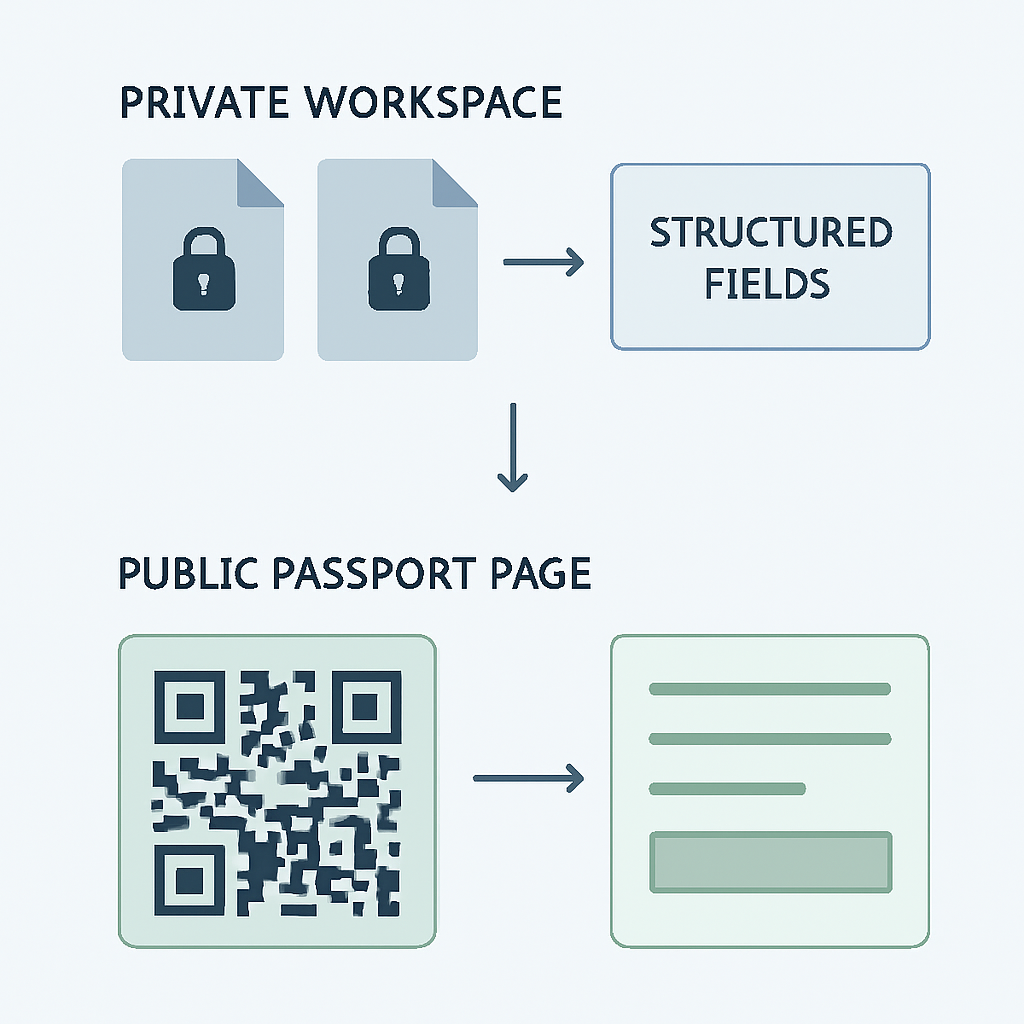
*Separate public passport data from private evidence so supplier documents stay encrypted in the private workspace while only approved fields appear on the public QR page.*
The safer structure is:
- Public passport data: the controlled product information you are ready to publish, such as product name, SKU/model, category, description, materials, manufacturing country, care, repair, recycling, certificates, claims, and public company contact details.
- Private evidence: supporting files such as certificates, manuals, supplier declarations, labels, reports, images, spreadsheets, and other documents kept inside the private workspace.
- Review and approval workflow: a governance step that confirms whether the product is ready before activating a QR page.
Product Passport Base follows this separation. The Builder is the private workspace for product data and evidence, while Public passports are the public QR-accessible pages. Evidence can be uploaded privately and is encrypted before being stored. It is not automatically shown on the public passport page.
Recommended data model for an electronics Digital Product Passport
Before asking suppliers for documents, define the structured fields you want to maintain per product. For electronics, start with a practical baseline rather than trying to collect everything at once.
1. Product identity
Create one structured record per product, SKU, model, or relevant product variation. Include:
- Product name
- SKU or model number
- Passport number or internal identifier
- Brand or company name
- Category
- Short description
- Preview image, if available
- Last updated date
This identity layer helps retailers, support teams, and customers know exactly which product the passport refers to. It also reduces confusion when similar models have different supplier evidence or recycling instructions.
2. Supplier and manufacturing information
For electronics, supplier data should be specific enough to support transparency but controlled enough to avoid publishing unnecessary confidential details. Useful structured fields may include:
- Country of manufacturing
- Manufacturing facility reference, if appropriate for publication
- Supplier-provided material or component information
- Public origin information where applicable
- Product category or vertical
You do not need to publish every supplier document. Instead, link structured public statements to private evidence records that your team can review internally.
3. Materials and composition data
A public passport can include materials with percentages and country or origin when applicable. For electronics, this might include casing materials, packaging materials, or other relevant material groups that the company has validated for publication.
A simple structure can look like this:
| Field | Example use |
|---|---|
| Material name | Aluminum, recycled cardboard, ABS plastic |
| Percentage | Share of relevant product or packaging component, when known |
| Origin or country | Supplier-provided origin, when appropriate |
| Evidence link | Private supplier declaration, certificate, or report |
| Public status | Draft, ready, or published |
The evidence link should remain private unless your company intentionally chooses to publish a safe summary or public certificate information.
4. Certificates and claims
Electronics companies often manage certificates, test reports, quality documents, labels, and claims. In a DPP workflow, separate the public claim from the private supporting evidence.
For each certificate, structure:
- Certificate type
- Certificate number, when appropriate
- Issuer
- Expiration date
- Related product or SKU
- Private file attachment
- Public display status
For each claim, structure:
- Claim text
- Verification level or review state
- Related evidence
- Publication decision
This avoids a common mistake: publishing broad product claims without a clear evidence trail. A DPP should help your team maintain a governed record, but the company remains responsible for the accuracy, permissions, legality, and update status of the data and claims.
5. Care, repair, and recycling guidance
Electronics passports are especially useful for post-sale support. Customers and partners may need clear guidance on:
- Safe care or handling instructions
- Repair instructions or repair contact pathways
- Recycling or end-of-life instructions
- Public company contact information
These fields are good candidates for public QR pages because they help customers after purchase and can reduce repetitive support questions. Keep the language simple and product-specific.
How to link evidence without publishing sensitive files
A practical DPP evidence workflow has four layers.
Layer 1: Upload evidence to the private workspace
In Product Passport Base, teams can upload evidence such as certificates, manuals, labels, reports, supplier documents, images, spreadsheets, and other files. Evidence is encrypted before being stored in cloud storage. This helps keep supporting files separate from the public passport.
Layer 2: Connect evidence to structured fields
Evidence is most useful when it supports a specific field. For example:
- A supplier declaration supports material origin.
- A certificate supports a public certificate entry.
- A repair manual supports public repair guidance.
- A packaging report supports recycling instructions.
This makes the DPP more than a public page. It becomes a structured digital record with an evidence trail behind it.
Layer 3: Review readiness before publishing
Not every product record is ready on day one. Product Passport Base supports product states such as draft, evidence, and ready. A workspace can also use approval controls before publication, depending on its policy.
A simple workflow is:
- Start in draft.
- Add product identity and supplier data.
- Upload private evidence.
- Fill missing public fields.
- Review readiness.
- Mark the product as ready.
- Publish the QR page directly or request approval, depending on workspace policy.
For a deeper workflow explanation, see Cómo gestionar estados de un pasaporte digital (draft, evidence, ready, pending approval) para publicar con control.
Layer 4: Publish only approved public fields
When the product is ready, the public passport can show safe fields such as product name, SKU/model, passport number, company, update date, QR, description, materials, manufacturing, care, repair, recycling, certificates, claims, and public contact details if configured.
The private files behind those fields do not have to be exposed. This is the key benefit of a governed DPP structure: you can provide transparency while keeping sensitive evidence protected.
CSV and TSV imports: useful for supplier onboarding
Electronics companies often receive supplier data in spreadsheets. Product Passport Base supports CSV and TSV import, so teams can move from scattered files to structured product records more quickly.
A useful import template might include:
- SKU or model
- Product name
- Category
- Description
- Material names
- Material percentages
- Manufacturing country
- Care instructions
- Repair instructions
- Recycling instructions
- Certificate type
- Certificate number
- Issuer
- Expiration date
- Claim text
- Verification level
After importing, your team can review the record, attach evidence, complete missing fields, and decide what is ready to publish.
Governance: who should be allowed to publish?
Electronics DPPs often involve product, compliance, sustainability, operations, and commercial teams. Without governance, public product data can become inconsistent.
Product Passport Base includes roles such as owner, admin, editor, and viewer. Owners and admins can manage sensitive settings, and workspaces can use manual approval before publication. This helps companies avoid accidental publishing and maintain a clearer audit trail of DPP decisions.
A practical role setup could be:
- Editors add product records, supplier data, and evidence.
- Viewers check information without editing sensitive settings.
- Admins review readiness and manage publication policy.
- Owners control workspace configuration and team access.
Publishing QR pages for electronics products
Once a product is ready, a QR-accessible public passport can support several use cases:
- Packaging and product labels
- Ecommerce product pages
- Retailer listings
- Customer support pages
- Repair and recycling instructions
- Partner and reseller information flows
Each published passport can be part of the public passport directory and can be searched by fields such as product, company, material, category, and verification state. If a preview image was selected when creating the product, it can appear on the public passport. If no image is available, the platform can show a category-related silhouette.
Connecting DPP data to ecommerce, ERP, and marketplaces
A DPP should not become another isolated database. Product Passport Base includes a connector hub in Operations for channels such as Shopify, WooCommerce, Amazon SP-API, Mercado Libre, Zalando, OTTO Market, PIM/ERP, and API/Webhooks.
The platform can export synchronization CSVs with fields such as SKU, GTIN, public passport URL, QR payload, materials, certificates, claims, and last updated date. It also provides technical mappings for channel-specific workflows.
Direct synchronization with each external channel depends on the merchant, seller account, credentials, permissions, or partner program required by that channel. The important point is that the passport record becomes a controlled source that other systems can read or map from.
Common mistakes to avoid
Publishing files instead of structured information
A PDF is not the same as a governed DPP record. Use files as evidence, but convert key facts into structured fields that can be reviewed and updated.
Mixing confidential supplier data with public passport content
Do not assume every supplier document belongs on a public page. Publish summaries and safe fields. Keep sensitive files private.
Creating one generic passport for many different models
If models, SKUs, materials, certificates, or instructions differ, create separate records or carefully manage variation-level data.
Treating verification as legal certification
Verification states can help communicate review status, but they do not automatically equal legal compliance, official certification, or regulatory approval.
Waiting for perfect data before starting
Start with product identity, basic materials, care, repair, recycling, and the most important certificates. Then improve coverage over time.
Practical checklist for your first electronics DPP
Use this checklist to create your first controlled product passport:
- Choose one product or model with manageable data.
- Create the product record with name, SKU/model, category, and description.
- Add a preview image if available.
- Import or enter supplier-provided structured data.
- Upload private evidence such as certificates, manuals, labels, supplier documents, and reports.
- Link evidence to the relevant product fields.
- Add care, repair, and recycling instructions.
- Review certificate and claim wording carefully.
- Check readiness and resolve missing fields.
- Move the product to ready.
- Publish the QR page directly or through approval, depending on workspace policy.
- Share the public passport link or QR in packaging, labels, ecommerce, or retailer workflows.
FAQ
What is a Digital Product Passport for electronics?
A Digital Product Passport for electronics is a structured digital record that organizes product identity, supplier data, materials, certificates, claims, care, repair, recycling, and other product information. It can be published through a QR-accessible public page while keeping sensitive evidence private.
Do I have to publish supplier files?
No. A strong DPP workflow separates public fields from private evidence. In Product Passport Base, evidence can be uploaded to the private Builder workspace and is not automatically shown on the public passport page.
What evidence should I upload first?
Start with the documents that support public statements: certificates, supplier declarations, manuals, labels, reports, images, spreadsheets, and recycling or repair documentation. Then connect those files to the structured fields they support.
Can a DPP help with EU regulatory preparation?
It can help you prepare structured product data, evidence trails, QR access, and governance workflows. However, it does not guarantee full legal compliance and should not be treated as legal advice or official EU certification.
What happens before a passport is published?
A product can move through states such as draft, evidence, and ready. Depending on workspace policy, publication may require manual approval before the QR page is activated.
Can I connect passport data to ecommerce or ERP systems?
Yes. Product Passport Base includes API access and connector-oriented exports and mappings for ecommerce, marketplaces, PIM/ERP, and API/Webhooks. Direct channel synchronization depends on external credentials and permissions.
start with one electronics product
You do not need to rebuild your full data architecture to begin. Start with one product, one SKU or model, a small set of supplier fields, and the evidence needed to support your public statements.
Create your first Digital Product Passport with Product Passport Base and turn product data, private evidence, and QR pages into a governed record for transparency, retail, post-sale support, integrations, and customer trust.