Digital product passport resources
Digital Product Passport Retail/Registry Setup: How to Register Official Supplier Links and Monitor Coverage by Brand
Retailers, marketplaces, resellers, and distributors often face a different Digital Product Passport challenge than manufacturers. They may sell hundreds or thousands of SKUs across many brands, but they do not control every factory, certificate, material declaration, or sustainability claim behind those products.
That creates a practical question: how can a retail team prepare for Digital Product Passports without rebuilding supplier systems or manually chasing documents for every SKU?
A Retail/Registry setup helps answer that question. Instead of treating each product passport as an isolated document, the retailer creates a structured digital record of coverage by brand, supplier, SKU, and official passport link. This makes it easier to see what is already available, what is missing, which links are official, and which products need follow-up before publication, listing updates, customer support, or transparency initiatives.
This guide explains how to register official supplier links, monitor Digital Product Passport coverage by brand, and use Product Passport Base as a governed workspace for retail DPP tracking.
What is a Digital Product Passport Retail/Registry setup?
A Digital Product Passport Retail/Registry setup is a structured workflow for tracking product passport availability across a retail catalog.
For a manufacturer, the core task is usually to create and publish passport records for its own products. For a retailer or marketplace, the task is broader:
- Identify which brands and suppliers already provide passport links.
- Register official supplier-provided passport URLs.
- Map those URLs to internal SKUs, GTINs, models, listings, or categories.
- Monitor which products have public passport data and which do not.
- Prepare transparency data for ecommerce, retail listings, QR access, support, repair, recycling, and partner workflows.
In Product Passport Base, the Retail / Registry module is designed for retailers, marketplaces, resellers, and distributors that do not manufacture everything they sell. It helps teams monitor multi-brand DPP coverage, register official supplier links, detect gaps, and prepare product listing data for transparency workflows.
It does not turn a retailer into a legal authority, certification body, or regulator. The retailer and supplier remain responsible for the accuracy, legality, permissions, claims, and updates behind their product information.
Why supplier link registration matters
When Digital Product Passport data is spread across emails, PDFs, spreadsheets, supplier portals, and product pages, teams quickly lose visibility. A buyer may have one link, the ecommerce team another, compliance may have a PDF, and customer service may not know which source is current.
Registering official supplier links creates a controlled reference point.
For each relevant product or SKU, the registry can answer:
- Does this product have an official DPP or public product passport link?
- Which supplier or brand provided the link?
- Which internal SKU, GTIN, or listing does it belong to?
- Is the link ready to use in a retail listing, QR flow, or internal workflow?
- Which brands have high passport coverage and which still have gaps?
- When was the record last reviewed or updated?
This is especially useful when a retailer sells products from many brands and needs a repeatable way to organize public product data transparency.
The core data model: brand, supplier, SKU, link, and status
A useful Retail/Registry setup should not start with a long legal checklist. It should start with a practical data model that your team can maintain.
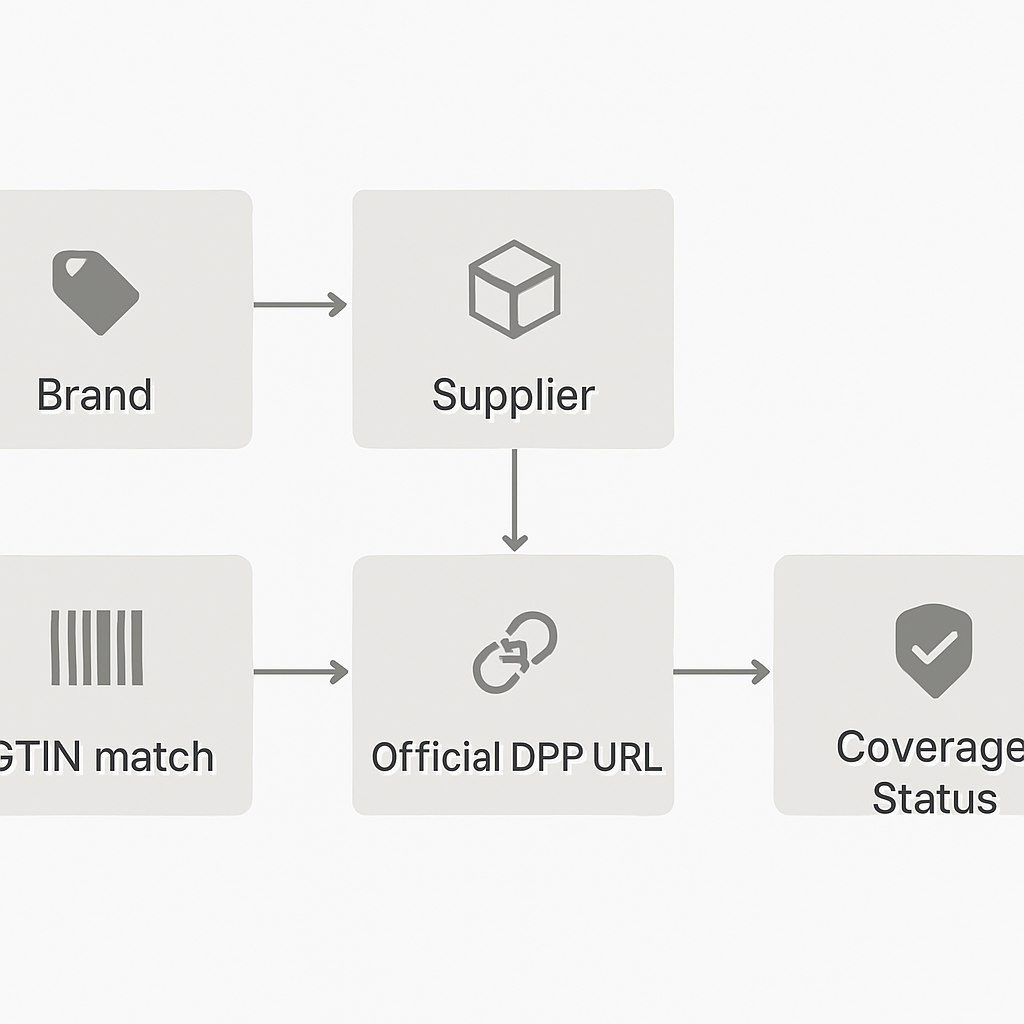
*Core retail/registry data model: link supplier-provided passport URLs to your internal SKUs, identifiers, and coverage status.*
At minimum, track the following fields:
| Field | Purpose |
|---|---|
| Brand | Groups coverage by brand or manufacturer. |
| Supplier | Identifies the business providing the product or passport link. |
| Internal SKU | Connects the passport to the retailer’s catalog. |
| GTIN / EAN / UPC | Helps match supplier records to retail listings. |
| Product name | Makes the record understandable to commercial and support teams. |
| Category | Supports filtering by textile, electronics, machinery, home goods, or other verticals. |
| Official DPP URL | The supplier-provided public passport or product transparency link. |
| Link source | Notes whether the URL came from a supplier portal, email, API, CSV, or brand website. |
| Coverage status | Tracks whether the SKU is missing, linked, pending review, ready, or published in a channel. |
| Last reviewed date | Shows when the record was last checked. |
| Notes / owner | Helps assign follow-up to buying, compliance, ecommerce, or operations teams. |
This turns passport tracking into a structured digital record rather than a set of disconnected messages.
Suggested coverage statuses for a retail DPP registry
A registry becomes useful when every product is not treated the same. Coverage status allows teams to prioritize.
A simple status model can include:
Missing
No official supplier passport link has been registered yet. The next step is supplier outreach or internal review.
Requested
The retailer has asked the supplier for DPP information, but no usable link has been received.
Link received
A supplier has provided a link, but the retailer has not yet reviewed it or mapped it to the correct SKU/listing.
In review
The link is being checked for basic usability, product match, public accessibility, and listing readiness.
Registered
The official supplier link has been stored and mapped to the relevant SKU, brand, and product record.
Ready for channel use
The link is ready to be used in ecommerce metadata, marketplace feeds, QR workflows, support tools, or internal systems.
Needs update
The link exists, but the product data may be outdated, broken, incomplete, or mismatched.
This type of status model helps retail teams move from passive document collection to active coverage monitoring.
Step-by-step: how to register official supplier DPP links
1. Start with a brand-level inventory
Before collecting every product detail, list the brands and suppliers in scope. Prioritize by sales volume, regulatory exposure, strategic importance, or product category.
For each brand, record:
- Brand name.
- Supplier or distributor contact.
- Product categories supplied.
- Number of active SKUs.
- Whether DPP links are already available.
- Internal owner responsible for follow-up.
This gives your team a brand coverage view before it gets lost in SKU-level detail.
2. Define what counts as an official supplier link
Not every public page should be treated as an official Digital Product Passport source. Define rules for what your team will accept.
For example, a link may be considered official if it is:
- Provided directly by the supplier, manufacturer, brand, or authorized portal.
- Hosted on the supplier’s official domain or approved passport system.
- Clearly associated with the correct product, model, SKU, or GTIN.
- Publicly accessible to the intended audience.
- Stable enough to be used in a listing, QR code, support flow, or partner workflow.
If a link comes from an unofficial reseller page, old PDF, image, or unverified third-party source, mark it for review rather than treating it as registry-ready.
3. Map supplier records to your retail catalog
Supplier data rarely matches retail catalog data perfectly. The same product may have different names, color variants, bundle structures, or model identifiers.
Create a mapping process using:
- Internal SKU.
- Supplier SKU.
- GTIN, EAN, or UPC.
- Model number.
- Product title.
- Brand.
- Category.
- Variant attributes such as size, color, voltage, or material.
This mapping step is essential. A correct DPP link attached to the wrong listing can create customer confusion and operational risk.
4. Register the link and source details
Once the link is matched, register it with enough context for future review.
Useful source details include:
- Who provided the link.
- When it was received.
- Whether it came from CSV, supplier portal, email, API, or manual entry.
- Which product identifiers were used for matching.
- Any caveats, such as language limitations or missing fields.
In Product Passport Base, retail teams can use the Retail / Registry workflow to monitor coverage by brand and register official links in a structured workspace instead of relying on scattered spreadsheets.
5. Review the public passport page before channel use
Before using a supplier DPP link in a retail listing or QR workflow, review the public page for basic readiness.
Check whether it contains:
- Product name and model/SKU alignment.
- Brand or company identity.
- Description.
- Materials or components where relevant.
- Manufacturing or origin information where provided.
- Care, repair, or recycling instructions where relevant.
- Certificates or claims where provided.
- Public contact details if available.
- Last updated date.
This review does not replace legal advice, official certification, or supplier responsibility. It is a practical operational check to avoid obvious mismatches and broken customer journeys.
6. Mark coverage status and assign follow-up
After review, set the product’s coverage status. If the link is correct, mark it as registered or ready for channel use. If not, assign a follow-up action.
Examples:
- “Supplier link broken — request replacement.”
- “GTIN mismatch — confirm correct variant.”
- “Passport available only as PDF — ask for public URL.”
- “Claims present but evidence not visible — ask supplier for confirmation.”
- “Ready for ecommerce metadata export.”
This keeps the registry actionable.
How to monitor coverage by brand
Brand-level coverage is one of the most important views for retailers. It helps teams understand which suppliers are ready and where operational gaps remain.
A useful coverage dashboard or report should show:
- Total active SKUs per brand.
- SKUs with registered DPP links.
- SKUs missing DPP links.
- SKUs in review.
- SKUs ready for channel use.
- Broken or outdated links.
- Last review date by brand.
From there, you can calculate simple metrics:
- Coverage rate: registered DPP links divided by active SKUs.
- Readiness rate: SKUs ready for channel use divided by active SKUs.
- Gap count: SKUs with missing or requested links.
- Review backlog: links received but not reviewed.
These metrics help prioritize supplier conversations. A brand with 500 active SKUs and 5% coverage may need structured onboarding. A brand with 95% coverage may only need periodic updates.
Example retail DPP coverage table
| Brand | Active SKUs | Registered links | Ready for channel use | Missing | Needs update | Coverage rate |
|---|---:|---:|---:|---:|---:|---:|
| Brand A | 240 | 210 | 190 | 30 | 20 | 87.5% |
| Brand B | 80 | 20 | 12 | 60 | 8 | 25% |
| Brand C | 35 | 35 | 35 | 0 | 0 | 100% |
| Brand D | 120 | 0 | 0 | 120 | 0 | 0% |
This type of table makes supplier readiness visible to buying, operations, compliance, ecommerce, and leadership teams.
Where Retail/Registry fits in the wider DPP workflow
Retail/Registry is not a replacement for a manufacturer’s product passport system. It is the retail layer that helps organize coverage across external brands and internal channels.
A complete workflow may look like this:
- Supplier or manufacturer creates a Digital Product Passport.
- Supplier shares the official public passport link.
- Retailer registers the link in its Retail/Registry workspace.
- Retailer maps the link to internal SKU, GTIN, listing, and category data.
- Retailer reviews the link for usability and product match.
- The link is exported or used in ecommerce, marketplace, QR, support, or partner workflows.
- Coverage is monitored by brand over time.
If the retailer also owns private-label products, it may create its own passports in the Builder module, publish public QR pages, and manage private evidence separately.
For a deeper workflow on structured product data and private evidence, see Digital Product Passport Structured Data & Evidence Workflow: From CSV Import to Encrypted Private Files.
Public link vs private evidence: keep the boundary clear
Retailers often need public passport links, but they may not need access to every private supplier document. This distinction is important.
A public passport page can show customer-safe information such as:
- Product description.
- Materials.
- Manufacturing information.
- Care instructions.
- Repair guidance.
- Recycling instructions.
- Certificates or claims where provided.
- Brand contact information.
- QR access.
Private evidence may include:
- Supplier certificates.
- Test reports.
- Internal declarations.
- Manufacturing documents.
- Technical files.
- Supporting images or spreadsheets.
In Product Passport Base, evidence uploaded into the private workspace is encrypted before being stored in cloud storage, and private evidence is not automatically shown on public passport pages. This helps teams separate internal documentation from public customer-facing data.
If you work with electronics suppliers, you may also find this related guide useful: Digital Product Passports for Electronics: How to Structure Supplier Data and Link Evidence Without Publishing Sensitive Files.
How connectors and exports support retail registry workflows
Retail DPP data becomes more valuable when it can move into operational systems.
Product Passport Base includes a connector hub in Operations for channels and systems such as Shopify, WooCommerce, Amazon SP-API, Mercado Libre, Zalando, OTTO Market, PIM/ERP, and API/Webhooks.
The connector workflow can help teams copy technical mappings and export synchronization CSVs with fields such as:
- SKU.
- GTIN.
- Public passport URL.
- QR payload.
- Materials.
- Certificates.
- Claims.
- Last updated date.
These exports and mappings work inside Product Passport Base. Direct synchronization with each external channel requires the merchant, seller account, partner program, credentials, and permissions required by that platform.
This makes the registry useful beyond internal tracking. It can become a source of structured data for ecommerce listings, marketplace feeds, support workflows, and partner reporting.
Practical governance rules for retailers
A Retail/Registry setup should include lightweight governance from the beginning. Without governance, teams may register duplicate links, use outdated URLs, or publish inconsistent information across channels.
Consider these rules:
Assign ownership by brand or category
Each brand or category should have an internal owner responsible for link collection, review, and follow-up.
Separate editing and approval
If possible, allow operational teams to add or update records, but require an owner or admin to approve important changes before channel use.
Record source and date
Always capture where the link came from and when it was reviewed. This reduces confusion later.
Avoid unsupported claims
Do not add claims to listings unless they are supported by the supplier’s data and your own review process. A verification or review status can help communicate internal confidence, but it does not automatically mean full legal compliance.
Keep public and private data separate
Only publish fields intended for public use. Sensitive evidence and internal notes should remain in the private workspace.
Review high-risk categories more often
Products with complex claims, technical specifications, sustainability positioning, batteries, electronics, or safety-sensitive materials may require more frequent review.
Common mistakes to avoid
Mistake 1: Treating every product page as a DPP
A standard product detail page may not contain the structured information expected in a passport DPP workflow. Register it as a candidate link only if it meets your internal criteria.
Mistake 2: Tracking links only in spreadsheets
Spreadsheets are useful for early collection, but they can become hard to govern. A registry workspace gives teams better structure, roles, review status, and export options.
Mistake 3: Ignoring variant-level differences
One DPP link may not apply to every color, size, voltage, bundle, or regional variant. Map carefully.
Mistake 4: Publishing links without review
A broken or mismatched link can damage customer trust. Review before using links in public channels.
Mistake 5: Mixing supplier evidence with public data
Private evidence should not automatically become public. Keep a clear boundary between internal files and public passport pages.
Retail/Registry setup checklist
Use this checklist to start your registry implementation:
- [ ] List brands and suppliers in scope.
- [ ] Prioritize brands by SKU count, sales, category, or risk.
- [ ] Define what qualifies as an official supplier DPP link.
- [ ] Create a minimum data model: brand, supplier, SKU, GTIN, product name, category, DPP URL, status, source, last reviewed date.
- [ ] Import or create SKU records.
- [ ] Collect supplier passport links.
- [ ] Map each link to the correct internal SKU or listing.
- [ ] Review public passport pages for product match and usability.
- [ ] Mark coverage status by SKU.
- [ ] Monitor coverage rate by brand.
- [ ] Export passport URLs or QR payloads for ecommerce, marketplaces, PIM/ERP, or support workflows when ready.
- [ ] Schedule periodic review for broken, outdated, or missing links.
How Product Passport Base helps
Product Passport Base is a web platform for creating, organizing, protecting, reviewing, and publishing Digital Product Passports. For retailers and distributors, its Retail / Registry capability is designed to help monitor multi-brand passport coverage, register official supplier links, detect missing records, and prepare listing data for transparency workflows.
It can support:
- Brand and SKU-level DPP coverage monitoring.
- Official supplier link registration.
- Public passport URL and QR payload tracking.
- Structured exports for retail and marketplace operations.
- Separation between public passport data and private evidence.
- Team roles and governance workflows.
- API access and connector-oriented operations, depending on plan and external permissions.
Product Passport Base is designed to help teams prepare and manage product transparency data. It does not guarantee legal compliance, replace legal advice, or act as an official regulatory certification body.
FAQ
What is a Digital Product Passport registry for retailers?
A retail DPP registry is a structured workspace for tracking which products, brands, and suppliers have official Digital Product Passport links. It helps retailers monitor coverage, identify gaps, and prepare public product data for channels such as ecommerce, marketplaces, QR codes, support, repair, and recycling.
Do retailers need to create passports for every supplier product?
Not always. If a supplier or manufacturer already provides an official public passport link, a retailer may register and map that link to its own SKU or listing. For private-label products or products without supplier-provided passport data, the retailer may need to create or coordinate passport records directly.
What should count as an official supplier DPP link?
A good rule is to accept links provided directly by the brand, manufacturer, authorized supplier, or approved passport system. The link should match the correct product, model, SKU, or GTIN and be stable enough for operational use.
How do I monitor coverage by brand?
Track the number of active SKUs per brand, how many have registered passport links, how many are ready for channel use, and how many are missing or need updates. Coverage rate can be calculated by dividing registered links by total active SKUs.
Can Product Passport Base connect registry data to ecommerce or marketplaces?
Product Passport Base includes connector-oriented workflows and exports for channels such as Shopify, WooCommerce, Amazon SP-API, Mercado Libre, Zalando, OTTO Market, PIM/ERP, and API/Webhooks. Direct synchronization with external platforms requires the relevant merchant credentials, seller permissions, or partner access.
Does a registered DPP link guarantee compliance?
No. Registering a link helps organize and monitor product transparency data, but it does not guarantee full legal compliance or replace legal advice, official certification, or supplier responsibility.
start with your first retail DPP registry view
If your team is still tracking supplier passport links in spreadsheets, emails, or disconnected product files, start by creating a simple brand coverage view: active SKUs, official supplier links, missing links, and review status.
You can use Product Passport Base to structure that workflow and turn supplier links into a governed retail registry. Create your first Digital Product Passport and begin organizing product data, QR access, and supplier coverage in one workspace.